Last night I was fiddling about with the different IRs I purchased from OwnHammer yesterday running different amp models in GarageBand through various IRs. What I came to realize is that while the amp models are okay and actually very nice for clean tones, their overdrive tones actually suck pretty bad with the IRs, and I wanted to do some recording this evening.
So this morning, I got a wild hair and hooked up one of my amps – an Aracom VRX18 which is based on the classic Plexi 18 circuit – and ran it through my Aracom DRX attenuator which can act as a load box, then ran a line out into my audio interface.
Then I opened up GarageBand, added a generic audio track, chose an IR and even though there was a lot of line noise (I was able to filter out a lot of it eventually), what I heard in my headphones was my amp – the way it should sound!
So like I said in the title, IRs are game changers for recording! Check out a comparison:
The first track uses a GarageBand British amp model going into a GarageBand British 1 X 12. The clean tone really isn’t all that bad if a little bright (which could be EQ’d), but I wanted to capture the raw, dry tone. The second track is my Aracom VRX18 amp into an OwnHammer IR. Damn! The difference is literally night and day; especially with the overdrive tones!
That’s it! I’m going to be using this technique for recording from now on!
PSA ~ If you’re on a Mac and have upgraded to OSX Catalina, the Lernvall Audio Convolver discussed here will not work! With Catalina, Apple decided to stop supporting 32-bit software. Some things will still work, but many plug-ins like LA Convolver will no longer work. I found this out the hard way…
But luckily, there is a solution called Pulse from Lancaster Audio. And guess what? It’s also FREE!!! Check it out here.
If you’re doing home recording, like me, you don’t have a lot of money to spend on expensive recording equipment or even just gear like amps and cabinets and especially, microphones. You need to find economical ways to lay down your sound. Well, I recently discovered Impulse Responses, which are digital profiles of real cabinets that you can use with GarageBand, either using the amp models or, using your own amp running into a load box (if it’s a tube amp) and using the IR as your virtual cabinet.
But to use them in GarageBand, I had to do a little digging. There were tutorials out there, but some skipped over some important information or the posts were so old that they were literally missing content. So I had to figure out a lot of stuff on my own, and once I did, I decided to do a tutorial myself.
First, you need a convolver plugin
Update: While the discussion below revolves around the LA Convolver, the same procedures apply if you’re going to be using the Lancaster Audio plugin.
A convolver is software that convolves an audio stream with an impulse response. To put it simply, this plugin allows you to load IRs for use in GarageBand. There’s no real magic here other than the great sound that the IRs provide. IRs are WAV files; though they’re actually special WAV files. If you tried to listen to them, they sound like clicks. The convolver plugin takes that WAV file and makes it usable in GarageBand as a speaker cabinet.
The one that I use – and seems to be the one that is most recommended (probably because it’s free) – is called LA Convolver by Lernvall Audio. You can download it here. It’s a ZIP file, so you’ll have to decompress it. Once you’ve done that, then you need to follow some discrete steps:
Copy or Move the LAConvolver.component file to the [Macintosh HD]/Library/Audio/Plug-Ins/Components folder.
Other tutorials said to open up GarageBand and you’ll see LAConvolver as an Audio Units plug-in. But that didn’t work for me until I restarted my Macbook. So I recommend that you restart or shut down and restart before you open up GarageBand.
If, after restarting, you still don’t see your plugins in GarageBand, then one of two things can be going on:
The restart didn’t refresh your audio unit plugins cache
Though not throwing an error, the plugin isn’t compatible with your system for some reason.
But more likely than not, it’s item 1 that’s the culprit. In that case, do the following:
Navigate to [Macintosh HD]/Library/Caches in Finder (or use Go menu).
Once there, find the following and throw into the trash:
com.apple.audiounits.cache file
[Macintosh HD]/Library/Caches/AudioUnitCache
Empty the trash
To be safe repeat this procedure in [Macintosh HD]/Users/<yourusername>/Library/Caches as well. For myself, I tend to do this when cleaning up crap on my Mac because I always forget if I installed something specifically for my username or making it available system-wide.
Once you’ve got everything cleaned up, reboot then restart GarageBand. That will trigger MacOS to rescan your Audio Unit plugins.
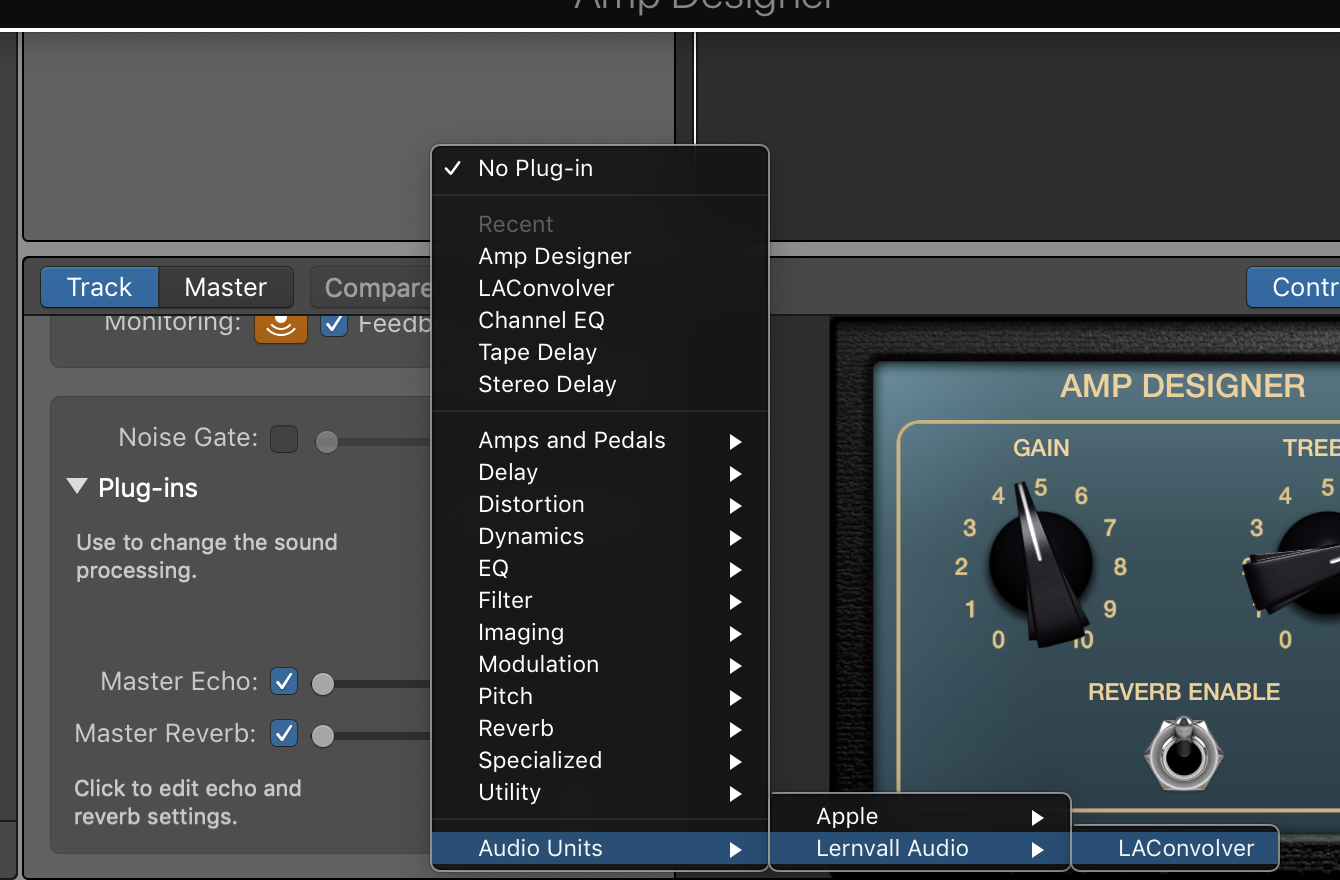
Once you open GarageBand, your convolver will be available as an Audio Units plug-in under Lernvall Audio (or Lancaster Audio if you’ve gone 64-bit) as shown below:
If you still don’t see it, then it’s possible that GarageBand was set up under your user profile on your Mac. For that, you’ll need to place the LAConvolver.component file into [Macintosh HD]/Users/<your user name>/Library/Audio/Plug-Ins/Components. This is what I had to do.
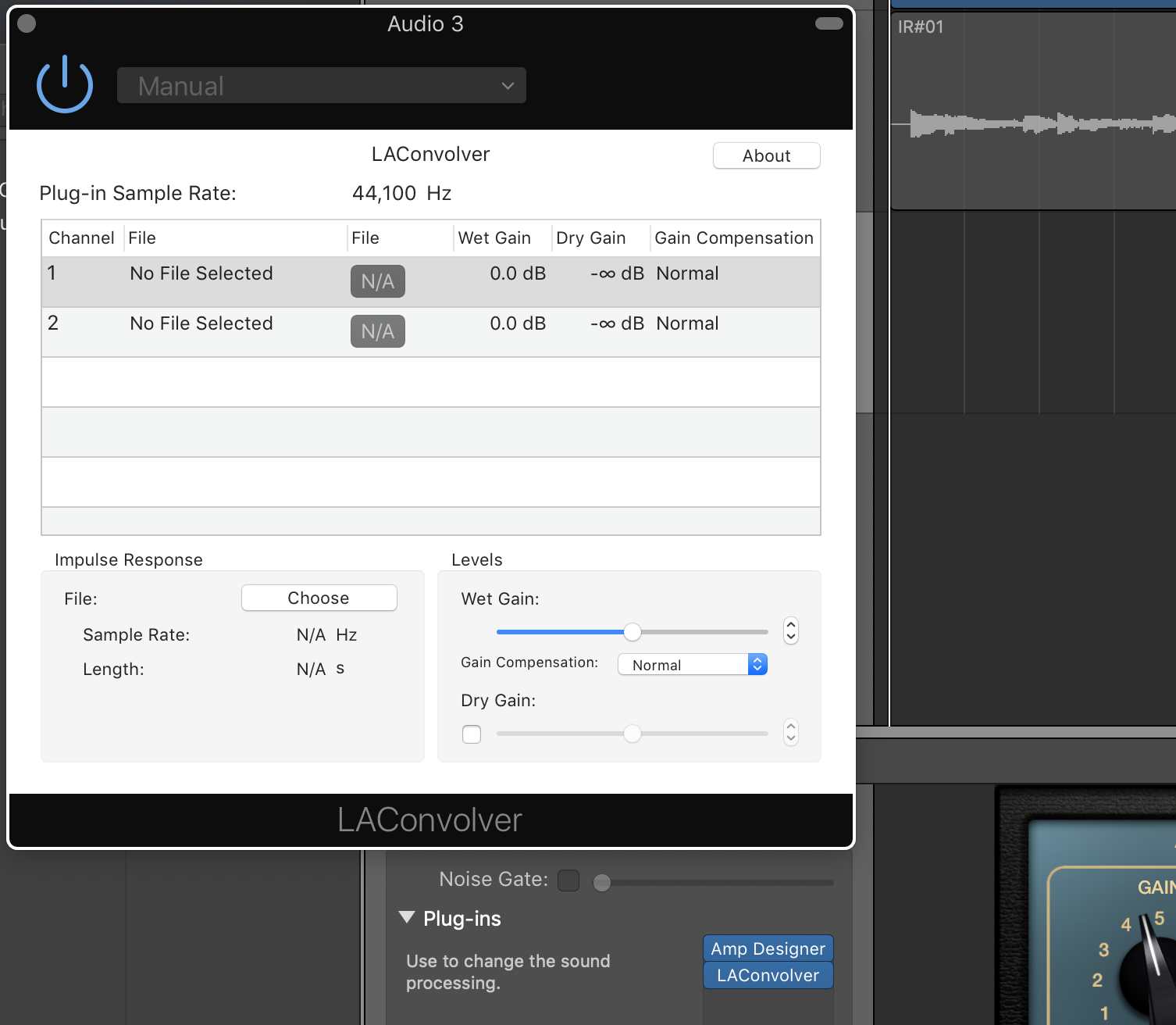
If LAConvolver was successfully added, then when you select the LA Convolver menu item, you should see the following plug-in dialog box:
We’ll get into loading IRs a little later. But first…
Next, you need to get some IRs
I’m a big fan of Pete Thorn, and he recommends using OwnHammer IRs. They have a free set that you can experiment with, but I just pulled the trigger on the Core Tone Bundle that consists of IR models of Fender, Vox, Marshall and Mesa cabinets.
Once you download your IRs (they come as Zip files from OwnHammer – not sure of other producers), I recommend that you move the Zip files to a convenient place. I put mine under a folder I created under the Music folder on my computer: [Macintosh HD]/Music/IRs:
Once you get the Zip files to a convenient location, you need to unzip them. With OwnHammer zips, they decompress to an OwnHammer folder. As you can see in the image above, I renamed the uncompressed folders to the cabinets so when I decompress another Zip file, it won’t overwrite my other IRs.
Understanding the IR Files
At least with the OwnHammer IR files, you might get confused by the sheer number of them as shown below for the Fender Deluxe Reverb (click on the image for a larger view):
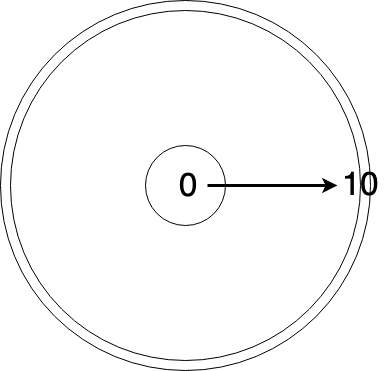
The reason why there are so many is that the IR’s come in different flavors. For the files numbered 0 to 10, these represent mic placement on the cone; 0 being dead-center to 10 being at the edge. These are the predominant file types. There are also a couple of others such as “FRED” that set the mic on the edge and angle it 45-degrees, and ROOM, where the mic is set at a distance and you get some room reflection (I love this, by the way). In the image above, I’m showing the “Mics” folder which includes IR files for individual microphones, while the “Mixes” folder includes a combination of a couple of mics.
According to OwnHammer, the numbers don’t represent a specific distance from the center as the numbers increase. They’re rough positions, so if you chose “OH 112 DVRB FN-AXA 57-05.wav,” you’d choose an SM57 positioned roughly between the center cone and the edge. The graphic below illustrates this:
As you’d expect, the further away from the center a microphone is positioned, the warmer the sound gets; in other words, you lose highs.
Now it’s time to choose an IR to use in GarageBand
There are a couple of ways to set up your guitar sound. The first is to input your amp directly, using a load box whose line out runs into your audio interface. Then you can just add the LAConvolver plug-in to your track, choose the IR you want to use, and you can start recording away! (More on this below)
But if you’re like me and are often pressed for time and just want to lay something down, using the Amp Designer plug-in in combination with LAConvolver is very easy. This will give you a complete software-based signal chain. Of course, the weakness here is that you can’t use pedals, but if you just need basic sounds, this will work nicely. So here goes:
First, create a new, blank track. Select “Record using a microphone…” option. You don’t want to use the canned guitar/bass option because once you disable the cab and use the IR, I found that it messes up the signal and your track volume goes WAY down. Once you set up the amp and IR though, feel free to add other plug-ins.
Next, add the Amp Designer plug-in to the track. Choose the amp model you want to use.
Set the cabinet choice to “Direct.” This is extremely important because you want to bypass the cabinet completely and use the IR as your cabinet.
Now, add the LAConvolver plug-in by going to the Audio Units menu and selecting “LA Convolver.” Once you do this, you’ll get the LAConvolver plug-in dialog:
Next, choose your IR. Click on one of the channel rows, then click on the “Choose” button. You’ll then get a File Chooser dialog. Navigate to where you stored the uncompressed IRs and select an IR. For me, I chose the following:
You’ll see that there are IRs for Atomic, Fractal, Kemper and Line 6, plus generic Wav-200ms and Wav-500ms. Not sure what the difference is as of yet, but I just chose the Wav-200ms at 44.1 kHz, 112 DVRB, FN-AXA, Mixes, and the OH 112 DVRB FN-AXA 57-05 IR file, which uses two mics position between the center cone and edge.
Note that each IR has two channels in LA Convolver. This is actually pretty cool because you can choose an IR for one channel, and another for the other channel. But for my setup, I used the same file on each channel.
NOTE: Some people have reported that they only see one channel. I’m not sure why this is other than it might have to do with your interface. I have a 2-input interface so it’s possible that LA Convolver sees this as a stereo input and adds another channel.
In any case, once you’ve chosen your IR files, the dialog should be filled in like so:
I haven’t played much with the Wet Gain other than just testing out the output volume which could be useful if the gain is too high and starts clipping the track.
So that’s it! Record your tracks! Granted, you’ll have to do quite a bit of testing to find just the right IR. I spent about an hour trying out different ones until I found something I liked. But that’s kind of the fun of it!
If there’s anything I’ve missed, please let me know and I’ll add it!
Recording Your Tube Amp
The obvious advantage that IRs bring to the table is that you can use your tube amp and crank it to its sweet spot – and do it silently. I can’t tell you how awesome this has been for me. Absolutely awesome. It enables me to – however virtually – pair my amps with speakers/cabinets that I don’t have.
The reason I added this section below is that recording your tube amp isn’t necessarily as straight-forward as you might think. I had to do quite a bit of playing around with the equipment I have to get it right.
First of all, you need to make sure you have a load box, and preferably one that has a reactive load as opposed to just a purely resistive/dummy load. Without going into technical detail, reactive load boxes are generally accepted as the better option as they more closely mimic the impedance curve of a speaker and thus sound better than their resistive counterparts. For a deeper dive, here’s a great article on the subject.
But even then, not all reactive load boxes are the same. For instance, the video below demonstrates the tonal difference between the Two Notes Torpedo Captor versus the Julius Music Box:
The Julius Music Box tone, while not that bad, definitely has sonic content missing. It’s quite noticeable. But it’s also half the price of the Captor and three and half times cheaper than the new Torpedo Captor X.
Now most higher-end attenuators use a reactive load and many have a Line Out that converts the speaker out signal to line level. My Aracom DRX150 has this and that’s what I use. Unfortunately for me, using the Line Out straight into my audio interface creates a ton of noise, so I have to run it into a DI first, then use an XLR cable into my interface.
There are other load boxes on the market such as the Suhr Reactive Load and Suhr Reactive Load IR that has built-in IRs. These are a step up on the basic reactive load boxes.
But be forewarned. Load boxes like the ones from Two Notes and Suhr are NOT cheap, costing about $250 at a minimum.
Load box configuration
“Hybrid” Attenuator-Load Box Solutions
The load boxes I mentioned above are dedicated boxes, but there are a few VERY nice boxes out there that not only provide reactive loads, but add a power amp and other features for even more versatility.
BOSS Waza Tube Amp Expander
To me, this is the ultimate. It provides a load, but has a power stage. You can actually load IRs into the unit itself (it already has IRs, but you can use your own) as it includes cabinet emulation. It even has built-in BOSS effects! It’s not cheap at $1299, but it brings a lot to the table.
Universal Audio Ox Amp Top Box
Close on the heels of the TAE is the Ox. It basically has the same features as the TAE but doesn’t include an effects loop and, of course, doesn’t have built-in BOSS effects. It’s also $1299, so it’s a bit pricey as well. But lots of people swear by this unit.
Fryette Power Station (PS-2 and PS-100)
At $699 for the PS-2 and $899 for the PS-100, what these units bring to the table make them definitely worth consideration. But of course, features are what’s important here and if all the Power Station brought was a reactive load, then $699 (or $899) would be too high a price to pay. But both of these units not only provide a variable reactive load (it’s a full sweep, not notched like others), both have a power amp and an effects loop, plus filters and presence to dial in the natural sound of your amp. The fundamental different between the PS-2 and PS-100 is that the PS-100 is a dual-mode unit that lets you have two different attenuation settings.
Whichever load box you choose, note that these aren’t just for studio use. I often use my attenuator in my live rig when I play smaller venues or at church. It allows me to get crunchy tones at a low volume. So there’s a lot of usefulness beyond the studio!
Computer Performance
Though I spent all that time above talking about using IRs in GarageBand, you have to bear in mind that IRs are files that need to be processed; that is, they use computing power. And if you have lots of tracks and/or use lots of filters, there’s going to be latency as your computer has to work harder.
And from that perspective, I’m actually considering using IRs in an external device like a Mooer Radar. By using a dedicated device like this, I won’t tax my Macbook Pro’s CPU. And from what I understand, there’s less than 2 milliseconds of latency with the Mooer. That’s VERY good performance.
The other reason I”m considering using an external device is purely for usability purposes. It’s great to use a plugin in GarageBand, but switching files takes a lot of time. With an external device, switching IRs happens with the turn of a knob or press of a button. It makes auditioning IRs A LOT easier.
Hopefully I’ve covered enough to get you started! The one thing I can tell you about using IRs is that they’re definitely game changers!
Like many, I don’t have a lot of money to spend on studio time, so I’m left to recording on my own. I’ve gotten better over the years with mixing and equalizing and in general, my production quality has gone up significantly. But one area where I haven’t been that satisfied is with guitars.
My “normal” way of recording guitars has been through close-miking my amps. But in the recent past, I’ve been using a lot of software sims for amps – they just make it easier. For instance, the amp models in the Amp Designer in GarageBand 10 (which is based on the Logic engine) are pretty damn good now. A few years ago, I wouldn’t have touched them because they were very dry-sounding and lifeless. But they’re so responsive and dynamic now that it’s just easier to use the models for recording.
Up until recently, I’ve just been using the default cabinets that are supplied with GarageBand, and admittedly, they’re just okay. They get the job done. And I’ve been able to EQ the guitar parts to liven them up.
But a few months ago, I discovered Impulse Responses (IRs), which are digitized profiles of speaker cabinets that were said to be extremely realistic. Companies like OwnHammer have huge libraries of cab/speaker sounds. I had heard recordings of IRs and was completely blown away by how good they sounded.
So today, I finally pulled the trigger and got the Core Library from OwnHammer to use in GarageBand. It took just a little while to get all the software configured and usable in GarageBand and once I had it set up, wow! What a difference in sound!
Below are clips that I made using a Silverface amp model totally clean, with the spring reverb set to 5. I used the default EQ settings on the amp model with no EQ in GarageBand.
Both clips actually sound pretty good. But the clip using the Impulse Response has a lot more definition – at least to my ears. 🙂
The GarageBand cabinet was the default for the Silverface 2 X 12 amp model. It is supposed to simulate the cabinet being miked with a Royer 121 ribbon. The IR I used was a profile of a 1 X 12 cabinet from a Deluxe Reverb and uses a combination of Shure SM57 and Royer 121 mics. I chose the IR file that positioned the mics roughly between the center and the edge of the speaker cone. You can’t do that with the default cabs in GarageBand!
With Impulse Responses, many are set up with different microphones PLUS positioning on the speaker cone. This is incredible because it allows you go really fine-tune the cabinet sound.
I’m looking forward to playing with this even more!
Ever since I got my BOSS Katana 50, I’ve gotten a sudden, renewed interest in modeling amps. My first modeling amp was a Line 6 Flextone III. That was a great amp, but modeling technology was still a bit immature at the time. The sound was actually great, but the feel just seemed a bit off. So I sold the amp believing that eventually, digital technology would improve.
Well, digital technology has improved, and in a big way. Even with software. For instance, the following Soundcloud track was recorded entirely with GarageBand amp models for the electric guitars.
When I recorded the song, I was all set to mic a couple of different amps. But to prep for the song, I just used some amp models. After listening to a couple of takes, I thought that the guitars sounded great, so I just went with the models.
Now, that said, if the song was much more focused on guitar, I would have used a regular amp, but since I was just adding little highlights, the digital models worked just fine. But this is where I started thinking that there are modelers out there that are now so super-high-quality, you’d be hard-pressed to tell whether or not an amp sound is digital or natural.
That damn Pete Thorn! 🙂 He’s a real Line 6 Helix lover, and I made the mistake of watching his videos of the Helix and HX Stomp, and I’m seriously gassing. Check out the Helix demo:
When I saw that video, and more importantly, listened to the sound, I was blown away. And I can attest to the dynamics of digital models: They respond much as you’d expect. Hit your string harder or turn up your volume knob on your guitar, and the amp responds to the gain. Years ago, that wasn’t the case, but manufacturers of digital models have totally figured it out.
Other notable amps are the Kemper Profiling Amp and the Fractal Audio Axe-Fx lines. These are apparently even better-sounding than the Helix, BUT I love that Line 6 made the Helix line as floorboard units (there is a 3U rack version as well). The other two are also more expensive than the Helix, and none of the others have floor models, though they have remote floor switches.
You can probably tell I’m leaning towards the Helix line. I was VERY close to pulling the trigger on an HX Stomp, but I’ve learned to hold back my GAS. It is so very tempting. However, because I’m still doing a lot of recording, I’m very interested in the Helix Native plug-in. It has all the models and cabs and effects as the physical units but in a convenient plug-in that I can use in GarageBand.
Last weekend I finally had the chance to gig with my Godin Artisan ST-V. It performed incredibly well, but it’s clear that I have a bit more work to do in dialing in my signal chain to get the best sound out of the guitar.
How do I describe the natural tone of this guitar? It is very much like a Telecaster tone, but with balls, if you catch my drift – like a super-Tele. I started out setting the amp at flat EQ to see where the guitar’s natural tone sits. Not a bad sound at all, but a little more midrange than I prefer. So I turned down the mids to compensate, but the guitar also creates a pretty fat bottom; not flabby, mind you, but it required that I dialed down the bass just a smidgen. That fixed the tone, and the result was a crisp and rich sound out of my Katana 50.
The other challenge that I had was using my drive pedal. When I got the Katana 50, it was going to be used expressly as a clean headroom platform. In that respect, it performs incredibly well. With all my other guitars, I use my trusty Tone Freak Abunai 2 for dirt. But it didn’t sound “right” with this guitar for some reason. I think it has to do with the fact that the Abunai 2 adds a bit of darkness, even with the diode lift setting (it acts as a traditional overdrive in this setting). With the natural fat bottom that the guitar produces, it was a bit much.
So I’m going to have to go back to the drawing board as far as overdrive is concerned. I’m going to have to try my TubeScreamer (TS-808), but I’m thinking that my Timmy pedal will work great with this as it is a really transparent overdrive.
As far as cleans are concerned, oh man! The cleans that absolutely love in a Tele are present in this guitar. Add to that the fat bottom-end and when played with an analog delay, the sound is pretty haunting. I love it!
As I said, I’ve got a bit more experimentation to do with this guitar. It has a unique and unexpected tone that I have not had in a guitar ever. This one for sure will be staying with me for years.
I didn’t mention that there’s also the Roland Blues Cube which is technically the same brand company as BOSS, but I won’t go there.
Just the same, there has been discussion as to which amp to consider. Well, considering the pricing, I’d say both. BUT, it’s really the sound that matters and what you’re after.
For those of you unfamiliar with the Nextone, this amp purports to model the sound and feel of – using BOSS’ TubeLogic technology – four different power amp stages: 6V6, 6L6, EL84, and EL34. As BOSS puts it, this will give you total control over your tone. Check this video out by the guys at Anderton’s:
VERY cool! There are notable differences between the valve amps and Nextone, but at least to my ears, they’re not differences that couldn’t be narrowed with a bit of EQ. I particularly liked the sound of the EL84 setting on the Nextone. It was nice and bright, while the actual AC30 was a little warmer.
Back to the question: Which one to choose?
This is a tough one to answer because – at least for me – I love the versatility of the Nextone, but on the other hand, what I love about the Katana is that it has a sound all its own. I set it up to have a response and midrange hump like a Marshall, but it doesn’t sound like a Marshall, so it kind of stands on its own in that respect.
I would totally consider the Nextone if I was doing a lot of covers. Being able to get the sound of different power amp sections would be totally useful for that. Also, this amp would be great for recording.
I use different amps for different songs so I could see using this to get a Fender sound when I’m recording reggae-style music. Then when I want a more hard-driving sound, I’d switch to the EL34 to get that Marshall sound. The versatility is incredible.
But that said, as with any amp, you have to do a lot of tweaking to dial in just the right sound. I imagine that would take a bit of time to dial in each power section model. That’s not a negative mark against the Nextone, but that kind of versatility comes at a price, and for someone like me who prefers to just plug in and play from the get-go, tweaking can be a bit tedious. It was an issue I had with my Line 6 Flextone III. Nice-sounding amp, but it required quite an investment of time to get it dialed in.
So to answer the question, if you want a lot of versatility, and are willing to tweak, definitely consider the Nextone. If you want something with a sound all its own, and much more plug in and play, then the Katana makes a lot of sense.
For those of you who are familiar with attenuators, you know they solve a real problem with cranking a tube amp to get the power tubes to fully saturate: The volume that even a low wattage amp produces when it’s cranked is LOUD, and an attenuator helps to alleviate that by taking the amp’s output and reducing the power that ultimately gets to your speakers. I can tell you from personal experience, being able to record my cranked amp at conversation levels has saved my ears and saved me from the wrath of my family getting pissed that my amp’s too loud.
But the drawback of reducing the output power to levels that low is that you take the speaker out of the equation. Most amps work best when their distorted signal works in concert with the speaker cone moving air as the speaker add its own character to the overall sound. For a recent recording I made, I had to wait until no one was home to record my overdriven guitar parts so I could take advantage of the speaker moving some serious air. My ears didn’t appreciate the abuse they got, but the result was so much better than close-miking an attenuated amp.
But the folks at BOSS have seemingly overcome that by providing a unit that not only attenuates a cranked amp but also provides models to mimic various cabinets via built-in IR and a whole rash of other features. I’ll list the highlights later. Watch this demo. It’s pretty cool:
Here are the features off the BOSS website:
First-of-its-kind tube amp command center, built with Waza expertise and the Tube Logic design approach
Advanced variable reactive load circuit with discrete analog components supports tube amps up to 150 watts
User-adjustable impedance tuning correctly matches the reactive load to your amp, retaining its natural tone, dynamic feel, and distortion characteristics
10 recallable rig settings for storing favorite setups
Deep real-time performance control via GA-FC/FS-series footswitches and MIDI I/O
Built-in 100-watt Class AB power amplifier with discrete analog design and seamless volume control
Powerful DSP section with 32-bit AD/DA, 32-bit floating-point processing, and 96 kHz sampling rate
Customizable stereo effects with premium tone quality: compressor, delay, reverb, and four EQs
Twenty-two mic’d cabinet emulations with five selectable close-mic types and three room-mic options, plus four slots for loading user speaker IRs
External effects loop with selectable series/parallel operation and control jack for switching amp channels
Parallel speaker outputs for connecting up to two cabs for gigging
Balanced XLR line outputs (mono and L/R stereo) for connecting to FOH console, stage monitors, and recording devices
Headphones output for quiet practice with cranked-up amp tones
Dedicated editor software (Mac/Windows)
USB for direct audio recording and editor communication
At $1299, it is not at all an inexpensive solution. However, that said, neither are the top attenuators that cost $500+. Considering the features this packs though, I’m surprised by the price point.
For me, this is something that I would seriously consider, especially for playing any of my tube amps on stage. I could attenuate the volume locally and use my speaker for local monitoring, then simultaneously send the signal via XLR into the board, eliminating a mic altogether and letting the sound guy do the mix.
Also, with the different IR models available, I could silently record my amp.
Since I’ve fixed up the guitar, I have been having some serious fun with it, breaking in the strings and honestly, getting the guitar used to being played again. In the meantime, I was waiting for information from Godin on the provenance of the guitar. And nothing is better than waking up to great news – Godin replied!
They gave me basic make and model specs, and though the geek in me would like to know even more about it with respect to scale length, nut width, etc., in the end, all that matters is that I play the damn guitar! 🙂 So here goes:
Model: 1992 Artisan ST V – I thought it was produced in 1996, but that was the last year it was produced.
Body: Limewood – Commonly known as basswood in North America, but called limewood in the British Isles and linden on the European continent.
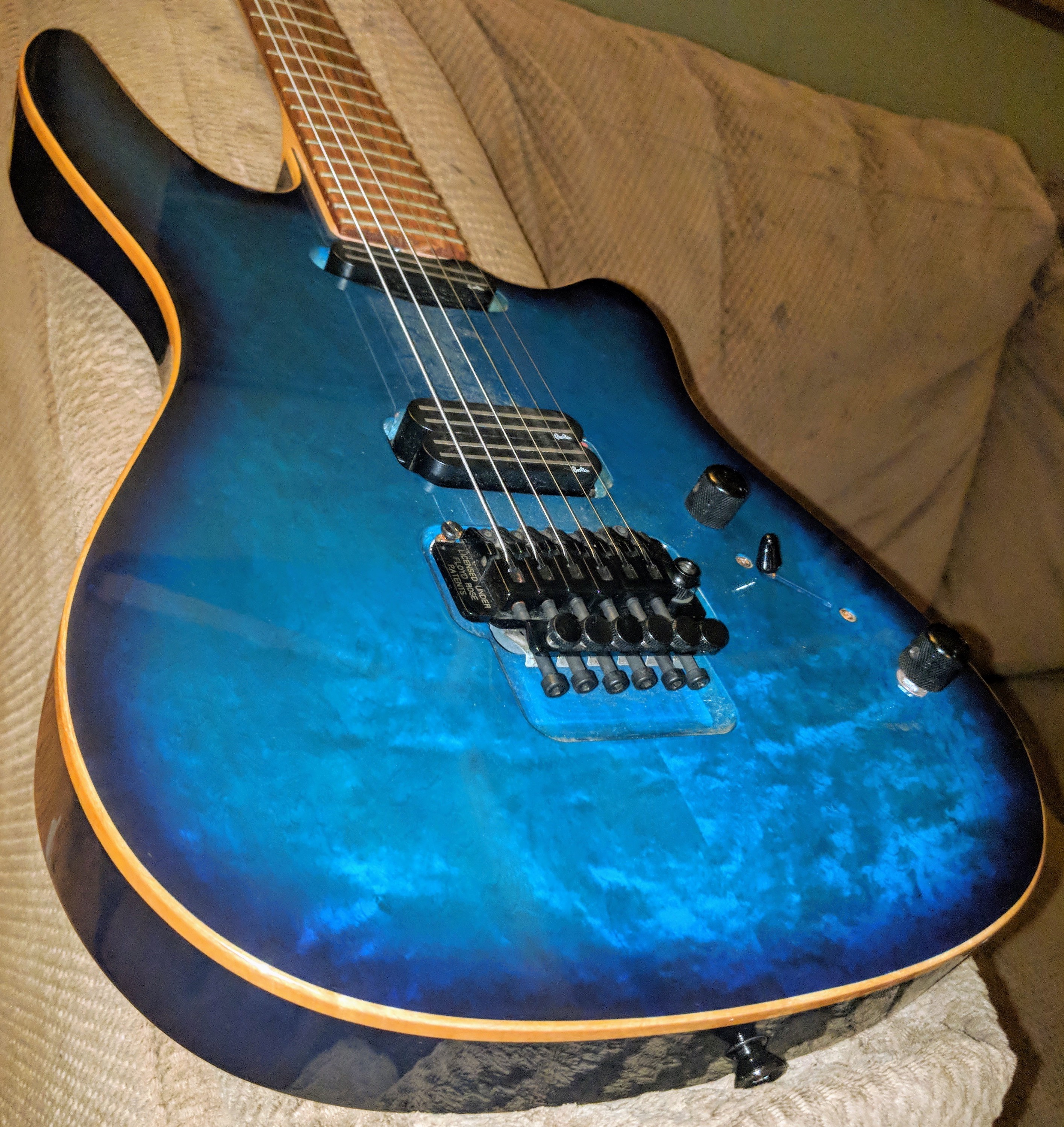
Top: Two-piece, figured maple in a blue burst finish.
Neck: Maple – The type wasn’t specified, but based on experience, it appears to be hard-rock maple.
Fretboard: Rosewood – Again, the type wasn’t specified. It doesn’t really matter anyway. It feels like rosewood.
Pickups: Godin pickups manufactured by Schaller.
As for the pickups, they include a push-pull pot on the tone knob. I thought it was a coil tapper, but it’s not. Turns out that that acts as a midrange filter that halves the dB level at 600 Hz. So no wonder there’s a minimal volume drop. But this is actually a VERY useful feature because the guitar is naturally bright in tone, and with a midrange cut filter, that will help when plugging into a naturally bright amp like my Fender Champ or either of my Aracom VRXs that are based on the 18-Watt Marshall Plexi.
After work this evening, I went directly to my local Guitar Center and bought some strings (for me, they’re Ernie Ball Slinky Cobalts). After I wrote my previous article on the guitar yesterday, I couldn’t stop thinking about the guitar. I spent the entire day today dreaming of working on it when I got home! I just had to get it cleaned and set up.
So as soon as I finished dinner, I set a blanket down on my kitchen table, and with my computer in front of me, played a couple of tech videos on changing strings on a Floyd Rose. Contrary to the negative feedback these get, though it’s a little laborious, it’s EASY!
Once I got the strings removed, I did thorough wipe-down of the entire guitar, removing smudge marks and dust and grime from the body and the neck. It was clear that this guitar got a lot of use in its heyday.
After cleaning it up to my satisfaction, I took some light linseed oil and massaged it into the fretboard. Talk about a difference. That oil added so much life back into the fretboard! Here are some pictures I took after I was done:
The grain of the rosewood is absolutely spectacular! The linseed oil helped renew its natural luster, the feel – oh the feel of that fretboard is nothing short of amazing!
Even after the fifteen years the guitar sat in a storage shed and the year and a half it spent in its case in my house, after I got it cleaned, I was blown away at the mirror-like finish of the top.
I need to break in the strings over the next few days with some regular playing. EB Slinky Cobalts are notoriously bright right out of the package and need a bit of time to break in. But here’s what I can tell you about the sound of this guitar.
Right off the bat, it has a real Telecaster quality to it replete with that subtle quack you get with a Tele.
I mentioned that the middle switch position was probably where I’d mostly play, and thus far, I haven’t changed my tune on that – yet.
The bridge humbucker has absolute BALLS! I set up my Katana 50 to about 2pm on the Gain with the Volume at 3pm and played some lead lines. The guitar absolutely sings with a glorious tone! It is definitely a rock machine in this setting.
Coil tapping the bridge amazingly doesn’t result in a huge volume drop. I have other guitars with this and going to single coil results in a significant drop in volume. With this guitar, the result is a thinner tone as expected, but a very little drop in volume. I’ll be using this a lot!
For clean tones, the neck pickup is definitely like a Tele’s lipstick character, and the bridge clean is like a Les Paul bridge clean (even with an LP, it ain’t my cup of tea). But using both pickups clean is very nice.
Once I break in the strings, I’ll post some sound samples! I definitely will be gigging this guitar this weekend!
For those of us who grew up in the ’70s and ’80’s, analog synthesizers were de rigueur to the music of the day. One of the most popular synths was the Prophet 5. I used to use a Yamaha DX-7, but there were some totally cool analog synths back then.
Back in college in the early ’80’s, a friend of mine had a Prophet 5 and I remember spending several hours twiddling knobs and getting some insanely cool sounds.
I always thought that it would be totally cool to be able to control a synth from a guitar, and lo and behold, by the ’90’s some guitars had built-in MIDI tracking (they weren’t very good), and others came equipped with a mini-DIN jack to hook up to an external synth. Godin makes a line of guitars that have that today (Daryl Stuermer of Genesis uses one). But that’s kind of a specialized kind of thing. My wish was to be able to plug into a synth with a 1/4″ plug. No fuss, no muss… Something like that could just sit on my pedal board.
My wish came true the other day when I got advance notice of the newly announced Pigtronix Resotron just officially released today, the first day of NAMM. Here’s the video I shared yesterday:
I’ve never been into things like bit crushers and other kinds of envelope filters, but I have always loved the sound of an analog synth. That Pigtronix has put one into a pedal using the same chip as the Prophet 5 and is the size of a standard pedal is… well… KICK-ASS!
I think the pedal is available now directly from Pigtronix. It goes for $249. This is one I’m definitely going to check out!









 Guitar Gear