If you’re like me and you’ve played a lot of reverb pedals (I’ve got 4 – though I only use two actively), then your reaction to the Hall of Fame might be similar to my own: “Ho-hum, another reverb pedal…” That’s how it was for me when I received the eval unit from TC Electronics. And despite having a choice of TC pedals to review, and my general attitude towards reverb pedals, I still chose to review this one because I was curious about how different it could be. Also, I wanted to compare it to my mainstay DigiTech Hardwire RV-7 Reverb.
I’ve used this pedal in four gigs since I got it, and I have to say that I’m impressed. A VERY cool feature that the Hall of Fame has that other reverb pedals I’ve used don’t have is the pre-delay switch. You have two settings: short and long. The pre-delay is the time between the dry sound and when the reverb kicks in. With a short delay time, the reverb kicks in pretty quickly, but that can sometimes create a really muddy sound. With a longer pre-delay, the reverb takes longer to kick in, so your tone is much more “in-your-face.”
This is one feature that is absolutely fantastic, and the one that I think sets this pedal apart from other mainstream reverb pedals. The gigs I played using this pedal were all acoustic. Most of the time I play fingerstyle, so note separation is very important to me. With a long pre-delay, every note I play comes through, and the reverb doesn’t become apparent until I have a pause in my playing. Very powerful function indeed!
As far as the reverb sounds themselves are concerned, they’re quite nice, and the pedal itself is dead-quiet. I placed the pedal in front of my amp and in the loop and it worked flawlessly in both positions, though admittedly, and especially with acoustic guitar, I prefer it in front of the amp.
In any case, I’ll be gigging with it a couple of more times this weekend, and I may even bring it to the recording studio for the sessions I’ll be recording. Stay tuned!
I love it when a company re-invents a line. The Fender American Vintage Series has been a mainstay product line for Fender for many years – probably their oldest product line – and they’ve completely recently re-vamped the series with all hand-made in the US of A. Now normally when I get news of Fender doing anything “new,” my reaction is typically, “meh.”
But this news intrigued me because of the detail that Fender took in re-creating these guitars from actual vintage models; making direct measurements to the instruments themselves as opposed to going off blueprints, and more importantly creating period-correct pickups. Then when I reviewed the Fender American Vintage Series site itself, I smiled to see that what Fender was creating was NEW guitars, not banged up relicked ones like the Roadworn Series.
So what you get with these guitars is brand-new, showroom-quality guitars built as if you were buying them when they were released. That’s a deal-maker for me! And these aren’t cheap offshore repros. They brought production back to the US for these and that pleases me – a lot. So American-made, period-correct, fresh-off-the-showroom-floor guitars? SOLD!
My personal favorite is the ’58 Telecaster – I love blondes. 🙂 John 5 compared that to his own ’58 and said he’d put his own safely under the bed and take the new on the road with him. What an endorsement!
My friend, Jeff Aragaki, of Aracom Amps, and a fellow lover and collector of Les Pauls – way more so that myself – sent me an email about a kind of Les Paul that he had never heard of, the Les Paul Elegant.
This is a Custom Shop guitar that didn’t have a very long production run, and was apparently the first of Gibson’s chambered LP’s. Most all have some sort of flame top, and from what I could find out weigh in the 8-9 pound range.
Owners have said it has a bit deeper of a tone than a pure solid-body LP, and the chambering pattern is completely different than the ones used in the Standards. Comes stock with 57 Classic pickups which help balance out the deeper tone of the guitar.
Furthermore, the fretboard has a compound radius cut: round to flatter from nut to heel. My 59 replica has that kind of tapering and it makes it VERY easy to play. OMG! I’d love to play one of these. Anyway, after a little digging, I found a thread on the “My Les Paul” forum that sums up the guitar very well:
The Les Paul Elegant is features great looks and tone. The body is made from mahogany with a triple-A grade maple top. There are open cavities in the body to reduce its weight while at the same time increasing its resonance. They are called dynamic chambers and help to increase the guitar’s interaction with the amp. This is similar to a certain degree with what happens with semi-hollow or hollow body guitars but at a much subtler level. The maple top with its transparent finishes gives a deep glow as well as the highly figured wood grain. You’ll find white-black multi-ply binding on the top and bottom of the body. The bridge is a classic Tune-O-Matic O-matic with a stopbar tailpiece.
The 24.7 5 inch scale length neck is made from a single piece of mahogany. It has an ebony fretboard with 22 frets with white binding around the neck. The binding also matches the pickup covers and 3-way pickup selector label. One interesting thing about this guitar is its compound radius fretboard. The fretboard at the first fret is flatter and gradually becomes rounder as you get towards the 12th fret. This allows for easier access to the upper registers while lead playing at the same time leaving the lower registers more adapted to chordal playing. The neck also has a long tenon to increase its connection to the body. The trapezoidal inlays are made of abalone and add a bit of ‘elegance’ to the already great looking guitar.
The pickups and electronics are all Gibson. It has the traditional two volume and two tone controls (one for each pickup) with a 3-way pickup selector wired: neck, neck+bridge, bridge. The pickups themselves have that great vintage sound. They are the ’57 Classic humbuckers which are replicas of the PAF (Patent Applied For) pickups found on the late 50’s Gibsons. The ’57 classic has a full rich and has enough to give it plenty of crunch. These pickups have Alnico II magnets and use vintage style enamel coated wire. The covers like the rest of the guitar’s hardware is nickel plated (chrome) for years of wear.
Features
* single piece mahogany back * Carved figured maple top * single-piece mahogany neck * Cream binding on body and neck * Nickel hardware * Tune-O-Matic o-matic bridge * ’57 Classic humbuckers * Two volume knobs * Two tone knobs * Three-way selector switch * abalone trapezoid inlays * Dynamic chambers in body
The only wrong information is that they got the direction of the radius on the fretboard wrong. This sounds like a nice guitar!
Other people have called this guitar the pre-Supreme. Older version of this guitar sported the Custom Shop logo, whereas later versions just had the “Les Paul” scroll. Wow! Talk about GAS attack!!!
A friend of mine has been considering buying a Les Paul Supreme or Custom (hoping to get it as a Christmas guitar). So as a favor, I did a bit of research on new Les Pauls and saw that all the new models, save the Standards use either Richlite or baked maple fretboards. Admittedly, I was a bit shocked by the use of Richlite, which is generally used as counter-top material, and thought what in the world possessed Gibson to make fretboards out of a fabricated material? But doing my best to keep an open mind, I perused my favorite forums to find discussions on the material.
What I found is that there are two camps out there: Purists and players. Purists want everything completely natural, and won’t even settle for laminated boards – they want a solid piece of wood. I was in this camp at first. However, I got brought back down to earth by the “players” whose only concern was that the guitar felt, played and sounded good. That has kind of been my ethos with gear, and I kind of forget it when I started getting into historic reissue Les Pauls. What I forgot is that my guitars are all players (with the exception of “Ox,” my ’59 replica which was specifically purchased for investment). What’s important to me is that a guitar feels, plays, and sounds appealing to me, and more importantly, that I can make music with it. So I’m going to get off my high horse, and take a good look at Richlite, and see if I can play some new Les Pauls.
As far as Richlite is concerned though, it’s actually highly appealing to me because it’s made in a very “green” way. Part of it is made from wood pulp from managed and sustainable forests plus pulp from recycled paper. On top of that, the heat used to incinerate the volatile materials from the production process is used to dry the material, so there is little thermal pollution, and finally, NO hazardous waste production.
Perhaps with Gibson getting busted for purchasing exotic woods from illegal sources was a good thing. Also, that Gibson, the manufacturer of what is one of the most iconic electric guitars in history, would choose to use a fabricated, “green” material for a tonewood is actually pretty cool to me, and could lead the way for other manufacturers to consider using green materials as well.
The great thing about the iPad or iPhone is that there are lots of apps. The bad thing about the iPad or the iPhone is that there are lots of apps. Though all apps loaded to the app store are vetted by Apple, they’re only vetted for general functionality, and not on the quality of the user experience or making sure the app doesn’t do anything illegal. As a result, there are lots of crappy apps in the app store. That’s to be expected, but it takes a lot of time wading through user reviews to make a decision if you’re looking for a particular type of application and there are several that do the same thing.
Such was the case when I was looking for an app that would help me replace my song binder which over the years, had grown to about three inches thick. It was pain lugging that thing around. But then recently, I discovered LINKSoft SongBook, a wonderful app that has allowed me to put my binder away, and use my iPad to display charts. It’s so convenient! And inputting music? No problem. With its integrated web browser, you can search songs on the internet, and you can import them into the app!!! That’s the feature that sold me on the app!
So along comes Ninebuzz wanting to promote their new app, Guitar Jam Tracks. I’m usually pretty leery of being contacted out of the blue, but in this case, I figured it was just an app, and I was willing to check it out. So I downloaded the app. I was not disappointed in the least.
At first blush, I found myself saying to myself, “Is this all there is? Just the pentatonic scale in the major keys?” But then I realized that that’s the power of this application. You get five jam track styles: Acoustic Blues, Humbucker Blues, Jazz, Reggae and Rock; in both major and minor styles, so 10 tracks in all. Pick a key you want to play in and the five pentatonic scale patterns and their respective positions on the fretboard appear on the screen. Press the play button and start jamming.
More experienced players may poo-poo this app, but I actually found it to be a very cool way to review the different positions. Also, the more experienced and adventurous can use this as a way to explore variations and joining and linking other types of scales. For me, especially when I’m playing live, if I’m not quite “feeling it” when it comes time to do a lead break, I will almost invariably revert to a 1st position pentatonic in the key that I’m playing. Then I’ll use that to break into other scales; not that I actually think, “Okay, I’ll now go from this major pentatonic into a Mixolydian.” I’ll admit that I use the pentatonic as a crutch, but it’s a good crutch because it gets me comfortable, and helps me get my mind off of thinking about what I’m playing and really trying to feel the music.
Such was the case when I started playing through the jam tracks yesterday before work (and just prior to writing this article). I picked a key, started following a pattern, then when I felt comfortable, started playing outside the patterns and exploring different possibilities. I’m not very academic with how I jam, I typically just go for it, and I found that the app actually helped me a lot.
For beginners, this can be an invaluable tool for learning how to improvise. I was originally looking for more with this app, but then realized that it’s absolutely perfect for what it’s trying to do. The problem you see with lots of instructional stuff is all the extra fluff like, “In this situation, play this, unless you’re faced with this, then you should play this…” That’s fine for more advanced instruction. For instance, Chuck D’Aloia of “Blues with Brains” fame completely changed my approach to playing. In his series of instructional videos, Chuck is all about situational awareness, and that has been more helpful to me than memorizing scales.
Circling back to Jam Tracks, it doesn’t give you any of that fluff because it’s not important. What I realized is that they give you the patterns, then it’s up to you play around, plain and simple. Some players may stay within each box, others may figure out that they can use the patterns to “walk” the fretboard. It doesn’t matter. The idea behind this app is to simply PLAY. More than anything else, with guitar, you can learn things intellectually, but until you actually start putting it to practice, your learning will not be complete. Jam Tracks gets you “doing” very quickly.
Gibson posted this on Facebook today… I love the green burst, but I’m not sure about the mint-green binding. White or black would work for me. But green? Anyway, they’re calling it the “Green Widow.” With that binding, I’d call it the Lucky Leprechaun because it reminds me of Saint Paddy’s Day. Since it’s a Custom Shop model, I wonder if you could request ivory-colored binding or even black binding. Other than that, that green burst is totally different, and something I’d consider. But with that green binding, the jury’s out for me…
Update 8/22/2012
Dammit! The more I look at that guitar, the more it grows on me. Binding aside, this is the one of the coolest burst patterns I’ve seen in awhile. The Manhattan Blue was gorgeous to me, but this Green Widow looks a little sinister as well as being gorgeous. IF I got one of these, I’d probably call her Morgana or Maleficent, or after some beautiful woman that has a touch of darkness to her. Joan d’Arc would be a cool name as well.
In any case, I’ve been looking for details on hardware and such, and even the Gibson site doesn’t have information that I could find. I’m hoping this isn’t a one-off because this would be a great guitar to check out. That translucent green burst is sexy as hell!
Summary: Great vocal processing PLUS great guitar processing all in one convenient box.
Pros: Superb vocal processing giving the singer powerful processing tools and very natural harmony voices. Guitar processing is top-notch. Output is super-quiet with no line noise whatsoever.
Cons: With such excellent sound quality, my only con is that there aren’t more harmony voices. Though of lower quality, the DigiTech Vocalist Live 4 has four voices of harmony, which opens up lots of possibilities. But note that this is just a nit, and definitely not a deal-breaker for me.
Price: $349.00 Street
Features:
200+ song & artist inspired presets for vocals & guitar
Dedicated guitar effects processing from TC Electronic. No amp required
Key for harmonies and pitch correction set automatically from guitar input
Plug in your MP3 player to the AUX input and sing along using Vocal Cancel feature
Built like a tank
Fine control over parameters for both voice and guitar
Output: Stereo, Mono, Dual Mono
Tone Bone Rating: 4.75 ~ Used this unit all weekend long, and despite my minor misgivings about having only two harmony voices max, the sound quality of this unit beats the crap out of my DigiTech Vocalist Live 4.
I’m tired. Three gigs in three days, and some coin in my pocket, and I’m a pretty happy man as well. But I didn’t realize I was as tired as I was until I sat down for a little dinner and started writing this article. Part of me not noticing my exhaustion is due to the inspiration I got from using the fantastic TC Helicon VoiceLive Play GTX. It’s amazing what good sound quality can do for sparking inspiration. For the first time in the hundreds of solo gigs I’ve done over the years, I was completely satisfied with my sound.
Guitar-wise, I was already covered, but vocally, I always knew my rig was lacking. But it was usually good enough, and I knew that the real solution was to simply add some other gear like adding a side-chain to my PA and insert vocal processing units. But being a solo artist, the thought of lugging more gear around just didn’t appeal to me, so I did my best with what I’ve had for several years, hoping that someday I could get a unit that had all the vocal processing I needed in a box. That someday arrived on my doorstep last Wednesday.
I didn’t get a chance to start playing with it until last Thursday night, and I spent a couple of hours dialing in a few presets that I would use for my gig on Friday. And after my gig, though I knew I had to make a couple of tweaks to the presets, I was completely sold on the unit. One of the servers at the restaurant that I work at on Fridays is also a professional singer, and she commented that my sound was “different” than usual. When I queried what she meant by that, she said, “It sounds so much better. So clear and present. It’s gorgeous.” That was all the affirmation I needed!
The first thing I noticed when I started my gig was the three-dimensional quality to my sound. I use a Fishman SA200 SoloAmp as my PA and acoustic guitar amp. It’s a six-speaker array that has great sound dispersal. But Friday night was the first time I felt that it was being used to its full effect. As I mentioned, there was a three-dimensional quality to my sound. I didn’t have to even turn up very loud. The sound was being dispersed as it should be. I think a lot of that had to do with the compressor in the unit. With effective compression, the “tighter” sound seems to project much more, and that is exactly what was happening as my signal issued from the SoloAmp. I didn’t even have a lot of compression dialed in; only 2.7 to 1, which is pretty light, but it was enough to squeeze my sound just enough to make my sound much more full and rich.
Fit and Finish
The VoiceLive Play GTX is a really small unit, measuring about 8″ X 6″ X 2.” It’s uncanny how much power this unit packs with such a diminutive footprint. But I absolutely DIG that it’s so small because it fits in my cord bag! This means that unlike my DigiTech Vocalist Live4, I don’t need a separate gig bag to transport it! On top of that, the metal housing is absolutely rugged, so this unit is totally gig-worthy, and for the amount of gigs that I do per year – I do over 100 gigs a year – I have no doubt that the unit will stand the test of time and the rigors of gigging.
The switches are top quality, and they’re extremely smooth; maybe a bit too smooth. I wish that the toggles had just a little snap. The problem that I have with smooth switches is that it’s easy to press the switch and not know that you’re pressing it. I had a similar issue with my previous unit. But I can understand the reasoning behind it in that in a quiet environment, a the click of a toggle might be a bit distracting.
The LCD screen is very easy to read, though as with any LCD, it can be a bit difficult to read in direct sunlight.
We Don’t Need No Stinkin’ Presets
One thing the manufacturers tout with their vocal processing units – and TC Helicon is no exception – is the number of “artist-inspired” presets. My DigiTech Vocalist Live 4 had 50 factory presets and 50 user presets, which were essentially copies of the factory presets but were editable. To me, that was fine because it gave me enough examples to use a reference points for editing. The VoiceLive has 235 presets, and the demonstrators do a great job of showing what the presets can do. But frankly, I don’t give a crap about the presets. There are a couple of reasons for this.
First, I’ve got great amps and I know what I want out of them. The amp models in the VoiceLive are actually quite good, but I personally would never use them. Same goes for guitar effects. There are some very nice guitar effects in the unit, but I have some incredible pedals like my Mad Professor Deep Blue Delay that simply kick ass over onboard effects.
As far as the vocal settings are concerned, being experienced at recording, every singer requires different settings to optimize the qualities of their voice. For instance, I’m a second tenor/baritone, so while I can sing fairly high notes, my tonal color is darker than a full tenor. From a mixing standpoint, I almost always have to have the lows rolled off slightly and require less compression. Presets rarely, if ever, work for me because they’re set for an average. So given all of that, I end up editing a few presets, and use just those in my performances. Such was the case with the VoiceLive Play.
Ease of Use
From my perspective, ease of parameter editing is the “secret sauce” of the VoiceLive Play GTX. TC Helicon must be so confident of this that the only documentation they include in the box is a connection diagram. The user manual and preset list can be downloaded from the TC Helicon site, but for basic setup, you don’t need a manual. The only thing I used the manual for was finding out how to get to the fine controls for the effects, and that just takes pressing the Effects “soft” button twice. Other than that, the editing interface is easy. The LCD screen layout is below:
To access an editing screen, you simply press one of the six buttons, called “soft buttons” on either side of the screen. That will bring up the screen associated with the soft key. Most screens have multiple pages which you can scroll through using the arrow keys. Parameters are adjusted with the control knob in the center. Once in a parameter editing screen, you enter edit mode for the parameter by pressing the soft key next to the parameter. Parameters show up as labeled rectangles on either side of the screen. What absolutely cool though is that the soft keys will light for only the parameters you can edit, providing a great visual cue that indicates what’s editable and what’s not.
Sound Quality
As if making it incredibly easy to set up and dial in, the sound quality of the unit incredible! I already described the three-dimensional nature of the sound, but on top of that, there are no errant artifacts or line noise that issue from the unit. It’s dead quiet. But to protect against that, the unit also has a little ground lift switch on the back to protect from ground loops or differing ground references in power sources. Here are a few example clips I recorded direct into my DAW:
Eagles: Peaceful Easy Feelin’
Beatles: In My Life
James Taylor: You’ve Got a Friend
If you do hear any noise, it’s from my microphone pickup ambient noise, but there is no line noise whatsoever. Note that in all the clips, it is the raw sound of the unit. No processing occurred in my production software at all. In the last clip, I noticed that it sounded a little processed. That was fixed at my gig on Friday by removing the chorus effect on the vocals.
I’ve evaluated several vocal processing units, and occasionally sounding like chipmunks with the high harmonies is unavoidable, but I found that the VoiceLive does a much better job of blending vocals than other units I’ve used in the past and generally has a much more natural sound to the harmony voices.
Overall Impression
Save for only have two harmony voices, which I also said wasn’t a deal-breaker for me, this unit ROCKS THE HOUSE! I’m simply blown away by sound quality, but also from the fine control over all aspects of the presets. This unit is going to go on my list of game changers for sure!
This is going to be a quick report, but all I have to say is that I’m totally sold on the VoiceLive Play GTX! I used it last night at my weekly restaurant gig where I play on the front patio of the restaurant in a rather expansive breezeway. The sound was incredible!
First of all, it was an absolute snap to set up, and a HUGE plus was the dual mono output setting that allowed me to have independent control over vocals and guitar. That was always an issue with my DigiTech Vocalist Live 4 when using it alone. Getting the right volume balance was always an issue, so I invariably had to run out of the guitar thru into the PA to control my guitar volume.
Even with light compression, my sound projected out and filled the space. It “felt” so much fuller and richer than with my old DigiTech Vocalist Live 4. I still have to tweak the presets’ reverb amounts a bit (they’re a little low for my liking), but I’m at a good starting point.
As far as the guitar processing was concerned, it’s good, and more importantly, good enough to use without having to run out to a pedal board. I’ll still probably run out to pedal board anyway, but there’s really nothing to complain about with the guitar sounds.
The other day, I received a shipment of a few pedals from TC Electronic to evaluate and review. I wrote a review of the MojoMojo Overdrive Pedal yesterday and this evening started evaluating the TC Helicon VoiceLive Play GTX vocal and guitar processor. Out of all the pedals I received from TC Electronic (I received four total), this pedal – or should I say unit – was the one that was going to be real important to me, because I use a vocal processor for my solo acoustic gigs for harmonies. For the last few years, I’ve been using at DigiTech Vocalist Live 4, and I still love it. But it’s showing its age now, and is pretty beat up, considering I gig with it weekly, and I’ve been getting nervous using it as of late.
My interest in the VoiceLive comes not only from needing a new unit, but also from listening to the demos out there, and also seeing/hearing its sibling, the VoiceLive Touch in action at a live demo done by Christine Havrilla, one of TC’s American demo artists (she’s the chick with the great voice in all the demo videos). What struck me about the VoiceLive technology then was how natural the harmony voices sounded. While I dig my VocalistLive box, I have to admit that the harmonies can sometimes sound almost chipmunk-like; but I wasn’t hearing any of that with the VoiceLive. So I was absolutely excited to receive the shipment because I finally had a chance to try out the unit myself, and see if I could get it dialed in so I could use in my gigs this weekend (I have three).
I “cheated” a bit before I hooked up the unit this evening by reading the manual online earlier this afternoon to get myself familiarized with the control possibilities; there are LOTS! But as I messed around with it tonight, while having read the manual was useful, with how easy it is to access all the parameters, I could’ve saved myself some time. It really is that easy to use!
The VoiceLive Play has 235 presets based upon various popular songs. Presets aren’t my thing, so instead of using the, I paged through presets and found three presets that would work with acoustic guitar. I then edited them, removing most of the vocal processing (I did keep some compression because that’s always a good thing), then tweaked the modulation effects so all the normal voicings would be the same. I would then construct harmonies for the “Hit” button. I also matched the guitar settings for two of them so I could switch between them in a single song. For instance, one of the presets has a single vocal harmony with “Hit” activated, while the second preset has two voices of harmony plus a doubling voice.
I edited these so I could switch between them mid-song, as some songs have sections that only require a single harmony voice, but other sections may requite more. A good example is the Eagles’ “Peaceful Easy Feelin.'” I recorded a sample of that:
I was concerned that I wouldn’t have the ability to switch presets mid-song while keeping “Hit” active as I was able to do that with my Vocalist Live 4. But the fact that I can do that with the VoiceLive is a HUGE plus. In fact, that might’ve been a deal-breaker for me if I couldn’t do that because having to tap dance from the preset selector to the Hit button would make things difficult while playing.
With respect to sound quality, the VoiceLive absolutely shines. The problem I’ve always had with my Vocalist Live 4 is that the guitar processing absolutely stunk. Admittedly, I’m not too impressed with the dirty amp models in the VoiceLive, but I’d never use them. But the mere fact that you can finely adjust the guitar sounds is absolutely huge for me because it means that I can choose not to use my pedal board with the unit. Sometimes I play in places where real estate is a premium, and having a couple of floor units – however small – takes up valuable space. For my larger venue gigs, I’ll probably still bring my board because my modulation effects are way better than the onboard effects of this unit. But the effects here are good enough. This coming weekend, I’ll be playing three gigs, and even though there will be space, I’m going to make it a point to not bring my board. From what I can tell so far from this unit, it’s going to work just fine with my Fishman SA220 SoloAmp.
Another place where this unit shines is in vocal doubling. With my old unit, I never used it because it did not sound at all natural. You can tell that a lot of work went into getting the VoiceLive’s vocal processing to a very high quality. Even recorded direct into my DAW, the vocals sound natural. Plus, there are all sorts of params that you can adjust that affect vocals; a big one for me being compression. Apparently, TC modeled their compression after a very well-known compressor (don’t know the name, but they mention it). I personally don’t use much compression, maybe 2.1 – 3.2 to 1 compression so I can retain dynamics, but it’s a necessity to have at least some, especially when playing in an open environment. Here’s a short clip of the Beatles’ “In My Life” that demonstrates the fantastic doubling and light compression:
All in all, my initial impression is simply this: I see a VoiceLive Play GTX in my immediate future and beyond!
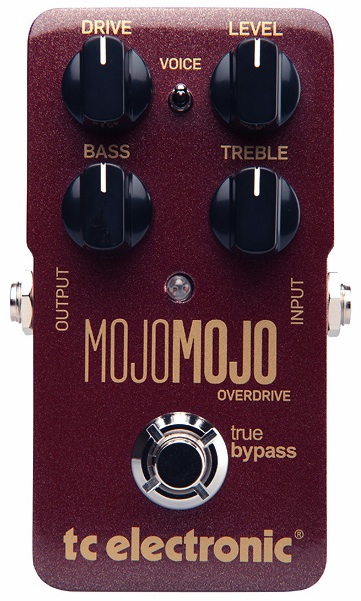
TC Electronic MojoMojo OverdriveSummary: This is a no-frills dirt pedal, and that’s a good thing. With toggle-switchable voicing and very responsive EQ controls, dialing in the pedal to work with your amp is a cinch! This overdrive will add an ever-so-slight dark coloring to your tone when active, but that’s a good thing as well.
Pros: Amp-like dynamic response. Works great as a dirt enhancer, and was obviously made for stacking. Nice, open distortion, and sags nicely at higher gain settings with minimal compression.
Cons: Can sound a bit compressed and mushy if EQ is not dialed in correctly, and finding the sweet spot can take a bit of time.
Price: $129.00 Street
Features:
Active Bass and Treble EQ controls
Drive and Level controls
Voice Toggle (up = flat response, down = slight treble boost for thicker-sounding guitars)
True Bypass
Tone Bone Rating: 4.75 ~ Yet another winner from the TC Electronic compact pedal line! As sort of a “mainstream” kind of overdrive, I really didn’t want to like this pedal. But after I got it dialed in with my amp and guitar, I found that I REALLY like this pedal!
Maintaining my objectivity is the hallmark of this blog. And when manufacturers send me gear, I am extremely careful to be honest with my reviews; not just in my writing but also honest with my tests; always doing my best to give the gear a fair shot. I want to exhaust all possibilities before I render a verdict – especially if I don’t like something, though that is certainly not the case with the TC Electronic MojoMojo Overdrive. As I mentioned above, I REALLY like this pedal and am impressed with it for a variety of reasons. Here are a few:
First off, this pedal is absolutely no-frills. One of the slogans that TC Electronic has used in the past is “No frills with a sound that kills.” That’s a very apt description of the MojoMojo. With this pedal, you set the voicing and EQ to match your guitar and amp, then set the level and drive where you want, and well… play.
Also, unlike a high-end overdrive like the Keeley Luna Overdrive that I recently reviewed that employs a fairly sophisticated Baxandall EQ that can drastically affect the voicing of the pedal to produce different overdrive sounds, the MojoMojo produces one type of overdrive. Once you dial in the EQ, you just adjust the drive and level to how much you need at a particular time.
I found that treating the pedal as if it was another gain stage in front of my amp worked best, as the pedal was designed explicitly to act with tube amp-like dynamics. Like high-end pedals, it’s super-responsive to pick attack and volume knob adjustments just like you’d expect with a tube amp. Very nice.
Though relatively inexpensive compared to other TC Electronic pedals – it’s $100 less than the Nova Drive – the quality that obviously went into the pedal from both a tonal and mechanical perspective is apparent. Tone-wise, the overdrive is open and smooth, with great note separation. Physically, the pedal is simply very well made. The knobs move smoothly but with good tension, and the on/off switch seems rock-solid. This is the type of quality that I’ve come to expect out of TC products.
I’ve known about this pedal for over year, and have read feedback on forums. From what I was able to gather, it’s a split-decision with how people feel about this. The people who like it, love it; there wasn’t much negative feedback that I found, but more tepid responses along the lines of “I couldn’t dial in a good sound with this pedal.” That actually puzzled me because even though I recorded playing through my DV Mark Little 40, I tested the pedal with four different amps and was able to get a great sound out of all of them.
What I came to realize is that more than any other pedal I’ve tested and reviewed, overdrive pedals are the most challenging to get to work in a rig. Dialing in EQ is usually pretty easy for me (there are exceptions, like the Keeley’s Baxandall tone stack that took me awhile to dial in because that was unfamiliar territory, EQ-wise). Where overdrives are challenging is balancing the distortion and level gain to fit with the amp. This is where I take a lot of time because I have to make a decision: Where do I want the distortion to come from? With some pedals, it’s better to get most or even all of the distortion from the pedal, with level set to unity gain. With others, I might want just a touch of distortion from the pedal, and add more level gain so that my pre-amp tubes do most of the work. Still, with others both amp and pedal may share equal duty.
With each different amp I tried the pedal with this evening, I had to go through the process of finding where I wanted the distortion to come from. With my DV Mark Little 40 (with 6L6’s), I found the best result was to let the pedal do a lot of the heavy lifting, and I set the level to just past unity gain so I could get a little volume boost, plus push my pre-amp tubes just over the edge to slightly break them up. Then I could vary the amount of drive to my heart’s content. On the other hand, with my Aracom VRX22, it was a more balanced affair, with the amp and pedal taking equal responsibility for the overdrive.
I think this is where a lot of people who didn’t really like the pedal – many claiming the tones to be too thick and harsh – may have strayed a bit in their evaluations. Quite simply, dialing in overdrive takes time because not only are you dealing with a clipping section, you’re also dealing with level gain. Add getting EQ dialed in, and it can get a bit hairy. Looking back, I’ve perhaps panned a lot of overdrives simply because I didn’t take enough time.
As for the MojoMojo, getting the pedal dialed in took less than a 1/2 hour. At first, I had everything at noon, but at that setting with my Les Paul and my DV Mark that outputs into a speaker that has a pretty big bottom end, the tone was a little muffled. Thank goodness for the voicing switch on the pedal. That cleared things up a bit almost immediately, then rolling off the Bass to about 11 o’clock and boosting up the Treble to about 2 o’clock added all sorts of clarity. With the EQ set, I was able to vary the Drive and Level, and maintain clarity, no matter where I set those controls.
How It Sounds
To me, the MojoMojo sounds killer. It’s mostly transparent, but it does have a bit of a darker color to it. There’s lots of midrange on tap, but apparently TC Electronic designed the pedal to retain lows. What has really sold me on the pedal though is its amp-like dynamics, which are superb. Here are some clips that I did:
The first clip, I wanted to demonstrate the response to volume knob adjustments. The first part is my amp with my Les Paul in the middle position with both volume knobs at 5. In the second part, I switch on the pedal, and you can hear how well the pedal’s breakup blends with the amp breakup. In the final part, I do a simple lead line with the pedal engaged, then crank up my bridge pickup. The pedal really responds!
In the next clip, I cover more dynamics; basically following the same pattern as the first: Amp only, guitar volumes at 5, then pedal enaged, then bridge pickup cranked:
The thing that’s very noticeable in the clips above is that the pedal loves a lot of input gain, and like a tube amp, with more input gain, reveals more sonic content in the form of harmonics and overtones. By the way, the pedal was set in both clips with Level at just above unity, and Drive at about 2 o’clock.
Finally, I thought that I’d try it out within the context of an actual song. In this clip, it’s the bridge section from a song that’s going to be on my next album that’s actually played underneath the vocals, which I muted here. For this, I had the Level at about 3 o’clock and the Drive at 11 o’clock, which slams the front end of my amp, plus adds a healthy amount of distortion. The result is a very touch-sensitve, singing overdrive distortion.
The original track is actually a bit on the brighter side. But what I love about this particular track is the darkness of the tone. I feels so much richer, and though there’s a LOT of gain with the combination of the pedal and amp overdriving, there is a distinct smoothness to the tone. To me, it’s very magical.
Overall Impression
It shouldn’t be too hard to deduce that I dig this pedal! I’m a huge fan of open-sounding overdrives, of which the MojoMojo produces. But that slight darkness is absolutely killer! I think this is a pedal that I intend to keep for awhile. Can’t wait to bring it to a gig!
 If you’re like me and you’ve played a lot of reverb pedals (I’ve got 4 – though I only use two actively), then your reaction to the Hall of Fame might be similar to my own: “Ho-hum, another reverb pedal…” That’s how it was for me when I received the eval unit from TC Electronics. And despite having a choice of TC pedals to review, and my general attitude towards reverb pedals, I still chose to review this one because I was curious about how different it could be. Also, I wanted to compare it to my mainstay DigiTech Hardwire RV-7 Reverb.
 My friend, Jeff Aragaki, of Aracom Amps, and a fellow lover and collector of Les Pauls – way more so that myself – sent me an email about a kind of Les Paul that he had never heard of, the Les Paul Elegant.
 The great thing about the iPad or iPhone is that there are lots of apps. The bad thing about the iPad or the iPhone is that there are lots of apps. Though all apps loaded to the app store are vetted by Apple, they’re only vetted for general functionality, and not on the quality of the user experience or making sure the app doesn’t do anything illegal. As a result, there are lots of crappy apps in the app store. That’s to be expected, but it takes a lot of time wading through user reviews to make a decision if you’re looking for a particular type of application and there are several that do the same thing.



 Guitar Gear