Feeds:
Posts
Comments

Archive for the ‘guitar gear’ Category

For those of you who’ve known me for a long time, I’ve been a PC devotee for as long as I can remember, and used to scoff at the Mac as being a toy. But a few months ago, I decided to try out a MacBook Pro at my previous job, and what I thought would never happen happened. I fell in love with the Mac. I have to say that it really boils down to falling in love with OSX, which is an incredibly usable operating system. Anything before that, I’d still be scoffing at the Mac as being a toy. There were lots problems with OS9, and I just didn’t like the interface. But with the new version of the OS, it’s just incredible! But I digress…

To make a long story short, my former company closed its doors 3 months after I arrived – yikes! But the fortunate thing for me was that I had to opportunity to get some equipment in the company’s fire sale. I ended up with two G5 iMacs, and real nice Dell laser printer.  Included with my iMacs is a nice little music composition program called Garage Band. I’ve been playing around with it for a couple of days, and I just love it! It doesn’t have the features of my ProTools, but for spec’ing out songs, it is incredible!

Central to Garage Band is the ability to drag and drop loops onto the workspace to create the foundation for a song. It’s a very easy process. You can drop guitar loops, organ loops, percussion and bass loops – there’s lots to choose from, and within minutes you can have a full song constructed on your workspace. Then you can add your own instruments by plugging direct into your Mac, or using the built-in microphone (not really recommended as it’s a very sensitive condenser mic and it picks up EVERYTHING).

For instance, this evening, I got an idea for a new song. I browsed around the loops till I found an acoustic guitar, bass, and percussion loops that I liked, dropped them onto my workspace, and arranged pitch and tempo as needed. Then I plugged my ES-335 directly into my iMac using a 1/4″ to 1/8″ adapter cable. Now here’s the cool thing about plugging directly into your Mac: Garage Band comes with built-in amp modelers and effects such as a noise gate, reverb and even delay. There’s even two manual slots available to add distortion and specific types of amp models. As to the amp models, they’re not all that good, but they get the general idea across. I wanted to get kind of a Tube Screamer effect on top of a clean amp, and with a couple of clicks, I had it.

The great thing about Garage Band for me is that I now spend less time getting the foundations of a song laid down, and can concentrate on my compositional ideas. Looks like I’m going to have lots of late night dates with my iMac… 🙂
Read Full Post »

If you’re looking for the ultimate in clean tone, go no further. Fender is the clean standard, bar none, and the Twin Reverb is the definitive clean amp. Like the original, it is a no-frills, no fuss amp, providing 85 watts of beautiful clean tone. There is no drive channel with this amp, folks. You get a normal mode and a reverb/vibrato mode. That’s it. But the clean tone that comes out of this amp is absolutely heavenly! I played two guitars with it: Custom Shop Strat, and a Les Paul Standard Double Cutaway.

With either guitar, I couldn’t get the amp to break up unless I cranked the volume on the guitars and amp to max – then it got really ugly. So when I say this is the definitive clean amp, I really mean it. For those of you who want distortion coming from saturated tubes, you’re out of luck here, but that’s not bad. One of the reasons this amp has had such success is that it takes pedals very easily. In fact, you might consider it to be a “tone canvas” that provides the base clean tone which you can color in a variety of ways using pedals.

The big difference between the Reissue and the original is that the reissue uses a solid state rectifier as opposed to using a tube rectifier. This might turn off tube amp purists, but I can see the logic of using a solid state rectifier: It keeps the cost of the amp way down, and you know what? I doubt that you could actually notice a difference.

Another thing… typical of Fender amps, the Twin Reverb is LOUD! The 2 X 12’s move a lot of air, so be forewarned! All in all, the Twin Reverb is a great, tone-shapeable amp, definitely worth a look!

Read Full Post »

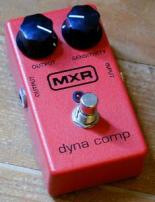
379_image_med_mxr-dynacomp.jpgI’ve been searching for a decent compression/sustainer for a long time, and I’ve tried out a bunch over the last year. Surprisingly enough, it wasn’t until recently that I decided to check out the MXR DynaComp. The DynaComp has been around for a long time, and has several faithful followers. Unfortunately, I’m not one of them. It’s not that this is a bad pedal – it’s pretty rugged, very simple to use, but it just doesn’t have what I need for the type of music that I play, which at the moment is bluesy and I use minimal overdrive. But I digress. This won’t be a long review. I’ll just give you my assessment…
I tried this out with a LP Double Cutaway and an American Standard Strat. For amps, I used a Fender Twin Reverb and a Marshal JCM 600 combo. Here’s what I found:

For clean playing, if you want a transparent box, this is not the box for you. It colors your tone quite a bit, even at lower compression levels. This is okay, if that’s your aim, but for me, since I prefer a bright sound, the amount of squeeze with this box was just too much for my tastes (though my dad who was with me liked how it sounded with the LP DC running clean through the Fender Twin). On the positive side, there was lots of headroom with this pedal, and no noticeable signal noise unless I cranked the intensity.

Where this box did shine was with the JCM in the high gain stage. The DynaComp really added a nice level of definition when used with heavy distortion (Note: my dad’s 75 year old ears couldn’t take the loud distortion so he waited outside the sound room :)). That was something I really dug about this box. The JCM 600 is one of those Marshall classics that has lots of crunch. The DynaComp smoothed that out a bit, but didn’t ruin the tone in the process. Nice.

Overall, this is a nice pedal if you regularly play in overdrive mode. But as I said, if you’re looking for a transparent compressor to use in your clean channel, I’d look elsewhere.

Read Full Post »

I just noticed something: This blog is called Guitar Gear, but I haven’t reviewed much gear! That’s going to change right now! The first piece of equipment I’m going to introduce is the BBE Sonic Stomp.

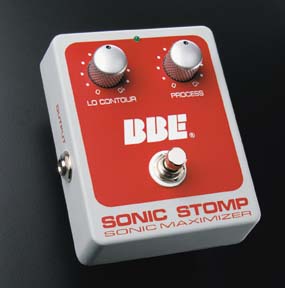
sonic_stomp_4in.jpgBased upon BBE’s very successful line of “Sonic Maximizers” – the Sonic Stomp actually uses the same technology from its 482i rack mount unit – this is a very unique pedal, and I’m going to go as far as saying this: YOU MUST HAVE THIS PEDAL. It’ll be the best $99 you’ve ever spent. So what makes it so special?
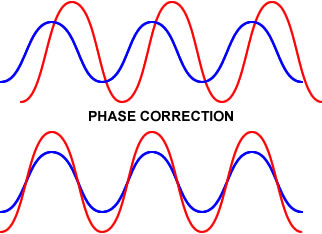
Without going into technical details, the Sonic Stomp corrects phase differences that occur between low and high frequencies coming out of an amp’s speakers; technically called “envelope distortion;” the net effect being that dramatic phase differences between low and high frequencies can produce what we perceive as a “muddy” or in some cases a “muted” sound. By time-aligning the frequencies, the signal is restored to a more accurate state, thus producing a much clearer, cleaner tone, and this is the gist of what the BBE Sonic Stomp does.

Now here’s the catch to this box. Unlike other pedals that either add drive or modulation to your signal, this pedal does signal correction, and in most cases you won’t even notice that it’s on! However, you’ll miss it when it’s off. It’s hard to articulate what that difference is. Let’s just say that with this pedal on, your already good tone just sounds that much better.

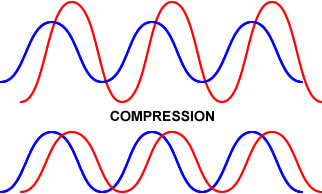
Now don’t confuse what this pedal does with a compressor. A compressor flattens gain, limiting the louder sounds and loudening the quieter ones (with makeup gain), thus creating a perceptibly fatter tone. This is very different than phase correction. See the figures below:

phase.jpg comp.jpg

I realize this is a fairly simplistic perspective, but as you can see, phase correction aligns the waves without acting on their amplitudes, whereas compression corrects amplitude but doesn’t work on phase.

So why might people confuse the two? Simply because when you correct phase, tonal qualities that you didn’t realize existed suddenly come to life. For instance, before I got this box, my amp had a real big, boomy tone. When I introduced the Sonic Stomp into my chain, my amp lost some of its boominess, which resulted in a much richer tone. It’s easy to mistake this as tone fattening as the lows got smoothed out and there seemed to be much more midrange, but I wouldn’t call it fattening – it’s more tone clarification – and this box it great at that!

So if you’re thinking about getting a tone shaping box, give the BBE Sonic Stomp a good look.

Read Full Post »

A friend of mine recommended that I try out a T5. He was raving about how cool it looked, and how you could switch from acoustic sound to a full-blown electric. I was a little dubious, considering that that’s really just modeling, and frankly, it was nothing new to me). Parker Guitars did this with “The Fly” well over a decade ago. But to be fair, I went down to my local GC to check one out and see what all the hype was about. So, under the guise of “Honey, I need to run some errands. I’ll be back in a couple of hours,” I ventured to my local GC, and played it for over an hour. The following is the result of that session with the Taylor T5:

Oops! Before I start on the actual review, I played the T5 through three amps: A Fender Acoustasonic Junior, a Fender Hot Rod Deluxe, and a Roland Cube 30.

Fit and Finish:

All Taylor guitars look great, and the T5 is a real beauty. I played a T5 with a beautiful royal blue finish – very sexy. The T5 also lives up to the Taylor standard of construction – all their guitars are very well-built. As far as acoutrements are concerned, personally, I’m not a real fan of low-profile knobs (when I’m in the middle of a song and want to make an adjustment, I want to be able to feel the knob – ooh, that didn’t sound good), but the knobs on the T5 fit in with its design nicely.

Feel and Playability:

The T5 has a nice narrow neck – very similar to my Strat and Ovation Acoustic/Electric – which I love, so moving around on this neck was amazingly easy and very comfortable. Acoustic players who are accustomed to wider necks will need a little time to get a feel for the neck, but should adjust pretty quickly. I had an easier go of it myself from playing my Ovation. When I first got that guitar, I had a bit of a break-in curve, but now it’s the type of neck I prefer.

Sound:

I know that I may piss some people off when I say this, but as far as sound was concerned, I was a bit disappointed. Based upon my conversation with my friend who raved about it, and lots of glowing reviews I read on Harmony Central and Musicians’ Friend, I was expecting a lot more with respect to tone – especially since the T5 starts at $1999, and goes up from there. I used the same evaluation process on the three amps I played the T5 on: On both amp and guitar, I started out by setting all the tone knobs to the mid settings. Guitar volume was set to midline, and since I was in a shop, I had to set the Fenders pretty low (they use logarithmic volume pots), while the Cube 30’s gain could be cranked while leaving the volume at a comfortable level. From there, I played the guitar in three different ways: 1) Fingerpicking; 2) strumming (using a straight sweep strum, and a percussive, attacking strum); 3) Then just playing various lead patterns in clean and high-gain modes.

Played clean with fingerpicking and lead playing, the T5 was very nice on all the amps; great clarity and sustain, though I really had to pump up the bass and turn down the treble on the amps to achieve a rich sound – especially on the Hot Rod Deluxe which, even with brightness off, plays pretty bright. Strumming in clean mode was pretty ugly on the Fenders – the guitar sounded like an acoustic plugged into an amp – very flat sounding, and no amount of EQ tweaking or reverb helped. Plus, when using a percussive strum pattern (think Michael Hedges), I would get an annoying popping sound. Probably has to do with the very touch-sensitive pickups, added to the touch sensitivity of the Fender amps. On the Cube 30 though, since I could apply some chorus, the tone cleaned up quite nicely, and helped dissipate the high end. If I was to use the T5 clean with a straight tube amp or acoustic amp, I’d run it into a compressor, a chorus, and then run the entire signal thorough a sonic maximizer – and possibly add an EQ pedal to texture the sound better.

In high-gain mode on the Hot Rod, the T5 actually sounded very nice. Even though I had to play at a lower volume, I could crank the drive and get a real nice distortion out of the T5. I think this is where the body vibration from the hollow body comes into play. It actually sounded a lot like my ES-335 in that mode; very pleasing to the ear, with a big, rich sound. With the Roland Cube 30 in the modeling channel, the T5 performed great with the gain at about midway, using the all the non-acoustic amp models. In the acoustic model on modeling channel, the T5 actually sounded VERY good, but then again, that’s a modeled sound.

Overall:

The Taylor T5 is a pretty nice guitar. Would I pay two grand and up for it? I don’t think so. I look at this guitar as being similar to a Line 6 Variax 700, which has a lot more features and guitar models built into it, and costs more than half the price less (I know, the T5 is NOT a modeling guitar)! Then again, I wouldn’t buy a Swiss Army Knife type of guitar period, mainly because even though it may sound real close to what it’s modeling, it’ll never get the exact voicing that the original gives you. For instance, if I want a thin, single coil sound, I’ll use my Strat. If I want a richer, boomier presentation, I’ll use my ES-335 (I’m also in the market for a Les Paul Double Cutaway, which I just adore). For acoustic/electric work, I’ll use my Ovation shallowbody.

Read Full Post »

« Newer Posts